Professional DICOM Viewer
for iPhone & iPad
View CT, MRI, X-Ray, and dental scans anywhere. MPR reconstruction, precision measurements, and AI-powered analysis. 100% offline. No account required.
From DICOM File to AI Report in 30 Seconds
No setup, no account registration, no cloud uploads. Just open and view.
Import screen
Import Your Scan
Open DICOM files from Files app, email, AirDrop, cloud storage, or DICOM CD. Supports .dcm, ZIP, and folder imports.
Viewer with MPR
Navigate & Measure
Scroll through slices, switch MPR planes, zoom, adjust window/level. Use ruler and angle tools for precise measurements.
AI report result
AI Analysis
Tap Analyze on any panel. AI identifies structures, highlights findings, generates a structured report. Ask follow-up questions.
See MedScan in Action
Demo Video Coming Soon
Open DICOM → Navigate → Measure → AI Analyze
Every Scan Type. One App.
From multi-slice CT to dental panoramics. MedScan automatically detects the modality and configures the right viewing tools.
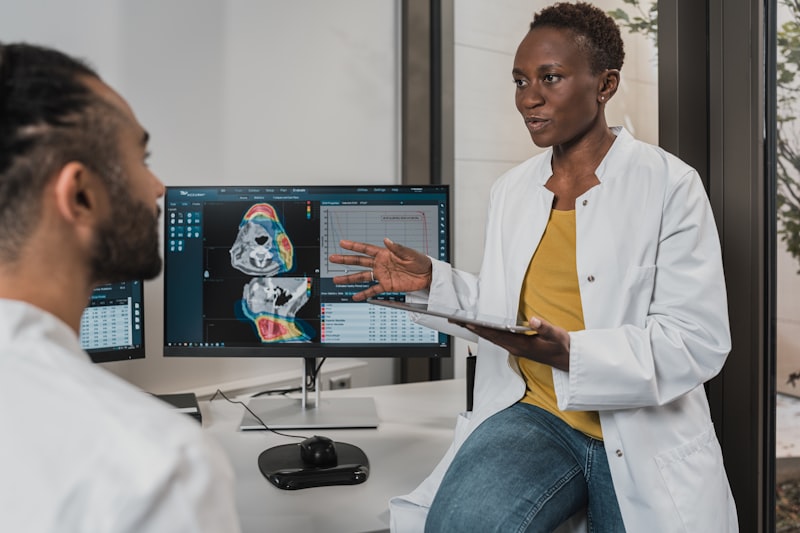
Desktop-Grade Tools. In Your Pocket.
The same capabilities you expect from a PACS workstation — optimized for touch.
Multi-Panel MPR
View axial, sagittal, and coronal planes simultaneously. 1x1, 2x1, 1x2, and 2x2 layouts with synchronized scrolling.
Precision Measurements
Ruler and angle tools with 3x loupe magnifier for sub-millimeter accuracy. ROI statistics and real-time HU readout.
AI Scan Analysis
One-tap AI analysis of any slice. Get structured findings, observations, and follow-up suggestions instantly.
100% Offline
No internet required for viewing. Your medical data never leaves your device. Zero cloud uploads.
Import Anything
Open .dcm files, ZIP archives, DICOM CDs, Google Drive exports. Even handles corrupted archives.
Blazing Fast
2000+ CT slices loaded in under 3 seconds. Smart caching — reopens studies in 33ms.
AI-Powered Scan Analysis
Tap any panel and get an instant AI analysis. Advanced vision models identify structures, highlight potential findings, and provide a structured summary. Ask follow-up questions in natural language.
- One-tap analysis on any slice or panel
- Structured findings with confidence levels
- Ask follow-up questions or request rewrite
- Works with CT, MRI, X-Ray, and dental scans
- Only sends current slice — never the full study
Requires internet. Not a substitute for professional medical diagnosis.

Powered by Claude Vision & GPT-4o
Faster. Cheaper. Better.
We benchmarked MedScan against every major DICOM viewer. The numbers speak for themselves.
Load Time (500-slice CT study)
Seconds — lower is better
*Cached reopen: MedScan 33ms — up to 250x faster than alternatives
Annual Cost Comparison
USD per year — lower is better
*MedScan Free tier available with no time limit
Why Professionals Choose MedScan
Most DICOM viewers are desktop-only, require cloud uploads, or lock basic features behind expensive subscriptions. MedScan is different.
Trusted by Medical Professionals
“Finally a DICOM viewer that works on iPhone without uploading my patient data to some random cloud. The offline mode is exactly what I needed for HIPAA compliance.”
Dr. Sarah K.
Radiologist
“I use MedScan to review dental CBCT scans during consultations. The measurement tools are surprisingly precise for a mobile app. My patients love seeing their scans on iPad.”
Dr. Michael R.
Orthodontist
“The AI analysis feature saves me time on preliminary reads. It catches things I might overlook when reviewing 40+ studies a day. Not a replacement, but a great second pair of eyes.”
Dr. Elena T.
Neuroradiologist
Simple, Transparent Pricing
Start free. Upgrade when you need advanced tools and AI.
Free
Everything you need to view scans
- View all DICOM formats
- All modalities (CT, MRI, X-Ray, Dental)
- Window/Level, Zoom, Pan, Rotate
- Auto W/L, Invert, Flip
- Up to 10 scans & 2 patients
- 100% offline
- ZIP & folder import
Pro
Unlimited scans, tools & AI
- Everything in Free, plus:
- Unlimited scans & patients
- Multi-panel layouts (MPR)
- Ruler & Angle measurements
- ROI statistics & HU readout
- AI-powered scan analysis
- Export & Share images
- Cross-reference lines
Also available: $19.99/year · $49.99 lifetime
Built for Medical Professionals
Whether you review 50 CT studies a day or check one dental panoramic — MedScan adapts.

Radiologists
Review CT and MRI studies on the go. Multi-panel MPR with synchronized scrolling, W/L presets, cross-reference lines.

Dentists & Orthodontists
Open dental CBCT, panoramic X-rays, and periapical images. Measure implant sites and bone density on iPad.

Referring Physicians
View patient scans from referrals without PACS login. Import from email, cloud, or DICOM CD.
Frequently Asked Questions
What DICOM formats does MedScan support?
MedScan supports all standard DICOM transfer syntaxes including JPEG, JPEG 2000, JPEG-LS, and RLE compression. It opens .dcm files, ZIP archives, and DICOM CD folder structures. Built with DCMTK 3.6.8 and OpenJPEG 2.5.0.
Is my medical data safe?
Yes. MedScan processes everything locally on your device. No data is uploaded to any server. No account is required. The AI analysis feature (Pro) sends only the current slice image — never the full study or DICOM metadata containing patient information.
Can I use MedScan for dental CBCT and panoramic scans?
Absolutely. MedScan auto-detects dental modalities: CBCT (CT), panoramic X-rays (PX), periapical images (IO), and cephalometric X-rays (DX). Measurement tools are available for implant planning and bone density analysis.
How does the AI scan analysis work?
Tap the Analyze button on any panel. MedScan captures the current slice as JPEG (without DICOM metadata), sends it to an AI vision model, and returns a structured report with observations. You can ask follow-up questions. Requires Pro and internet.
What are the free tier limits?
Free users can store up to 10 scans and 2 patients simultaneously. All viewing tools are available for free. Deleting a scan frees up space. Pro removes all limits and adds MPR, measurements, and AI analysis.
How does MedScan compare to other DICOM viewers?
Most DICOM viewers are desktop-only, require cloud uploads, or cost $50-800/year. MedScan is the only iOS-native viewer with AI analysis, 100% offline mode, and a free tier. It loads studies in under 3 seconds and reopens cached scans in 33ms — faster than any desktop alternative.
View Medical Scans Anywhere
Built for medical professionals who need fast, private, reliable DICOM viewing on the go. Free to download. No account. No cloud uploads.
Download Free on App Store